 Project Controls 360
Multi-project portfolio dashboard from P6
Several Primavera P6 projects, each updated monthly, rolled into one Power BI model. Pick a project or see the whole portfolio, with the same measures on every page.
3projects in one model
14report pages on the same data
1 folderfor every project and update
1 refreshto update all projects
The problem
Each project had its own P6 file and its own monthly report. Getting a portfolio view meant copying numbers from every project into one more spreadsheet, every month.
Approach
- One folder for all projects. Monthly XER files for every project go into one folder, each tagged by project and data date.
- One model, one set of measures. SPI, forecast finish, slippage and percent complete are calculated once and work for any project or the whole portfolio.
- Portfolio first, then drill down. Start at the portfolio overview, then open a project, a WBS area or an activity.
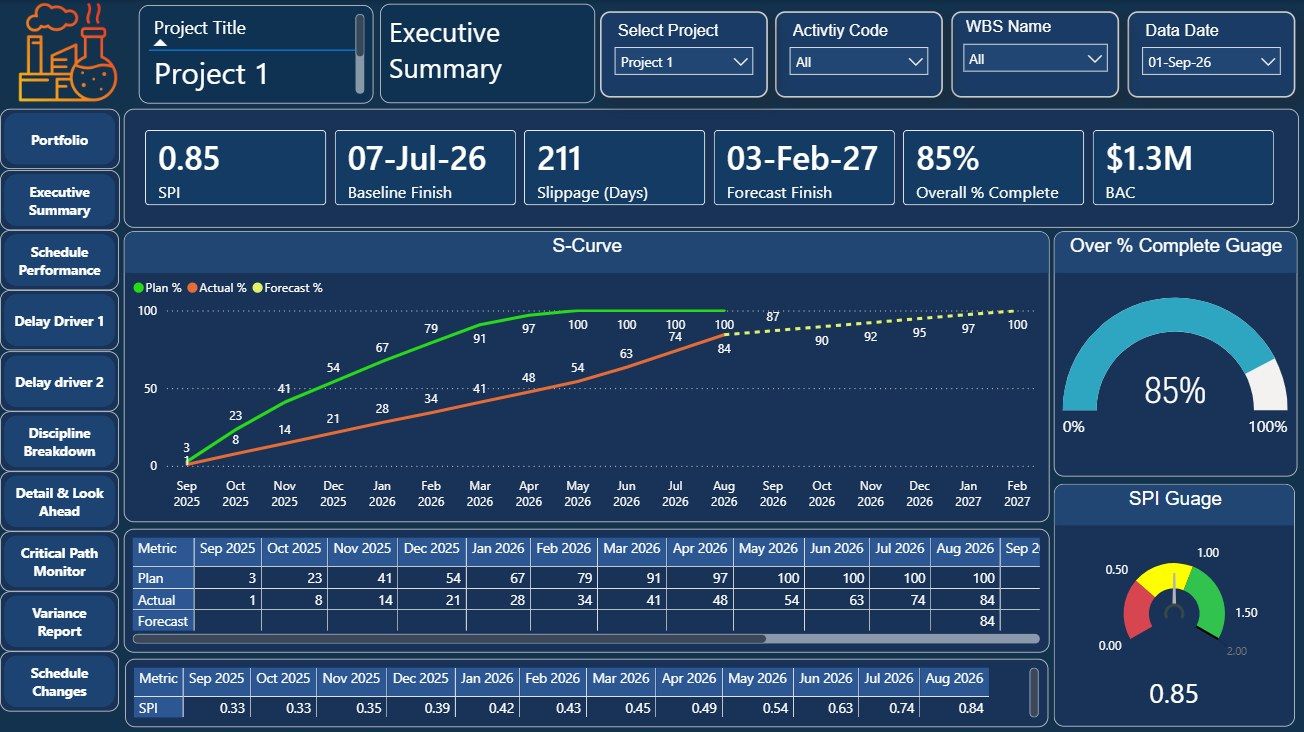
Walkthrough
Result
One refresh updates every project, and the portfolio view is ready without another spreadsheet.
Project and client identifiers are hidden in the screenshots.