 Project Controls 360
Float erosion early warning
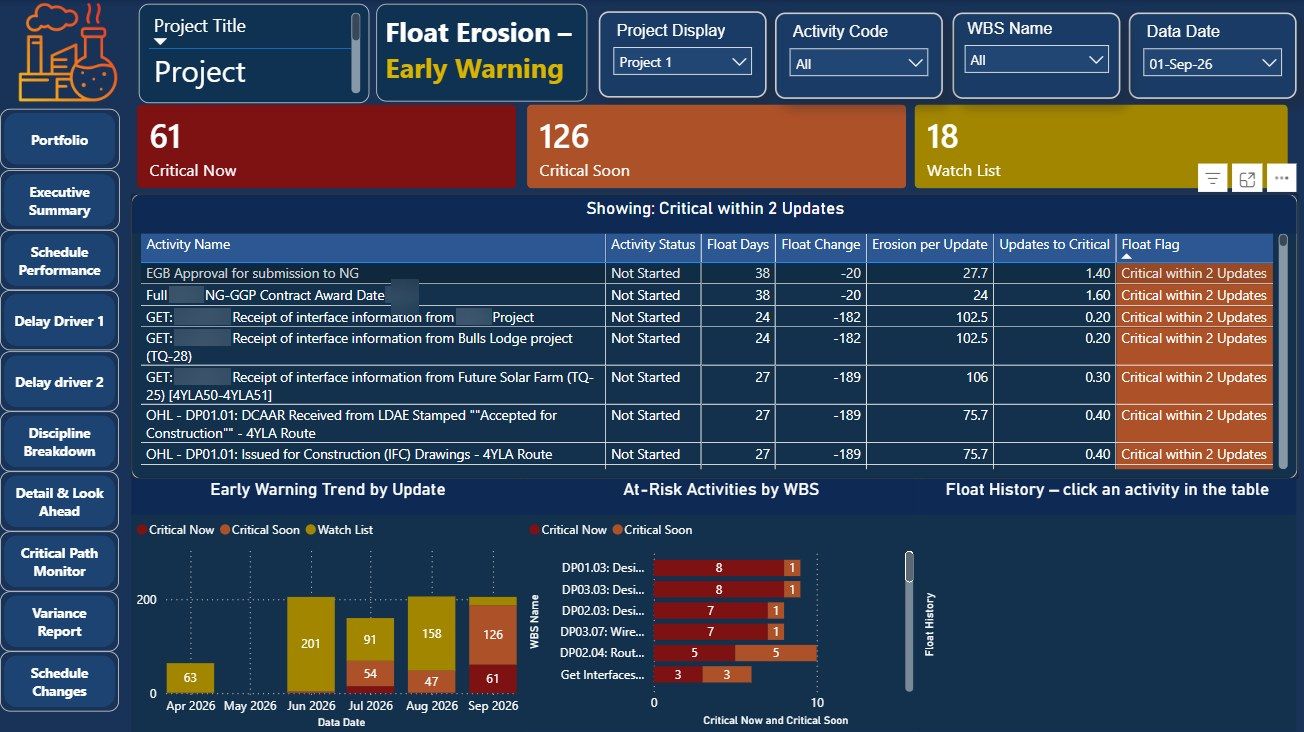
Activities rarely become critical overnight. Their float drops a little every update. This page tracks float across updates and flags activities that will turn critical at the current rate.
61critical now in the example
126critical within two updates
18on the watch list
Every updatefloat history per activity
The problem
A float check on a single update only shows what is critical today. It does not show the activities that are losing float steadily and will be critical next month.
How it works
- Track float for every activity across updates. The change in float and the erosion per update are calculated for each activity.
- Forecast when it turns critical. At the current rate of erosion, each activity is flagged as critical now, critical soon or watch list.
- Follow the trend. Charts show the warning list by update and by WBS, and the float history for any activity.
Walkthrough
Result
Activities losing float are flagged before they reach the critical path, while there is still time to act.
Project and client identifiers are hidden in the screenshots.