 Project Controls 360
Earned Schedule: why the schedule looks better than it is
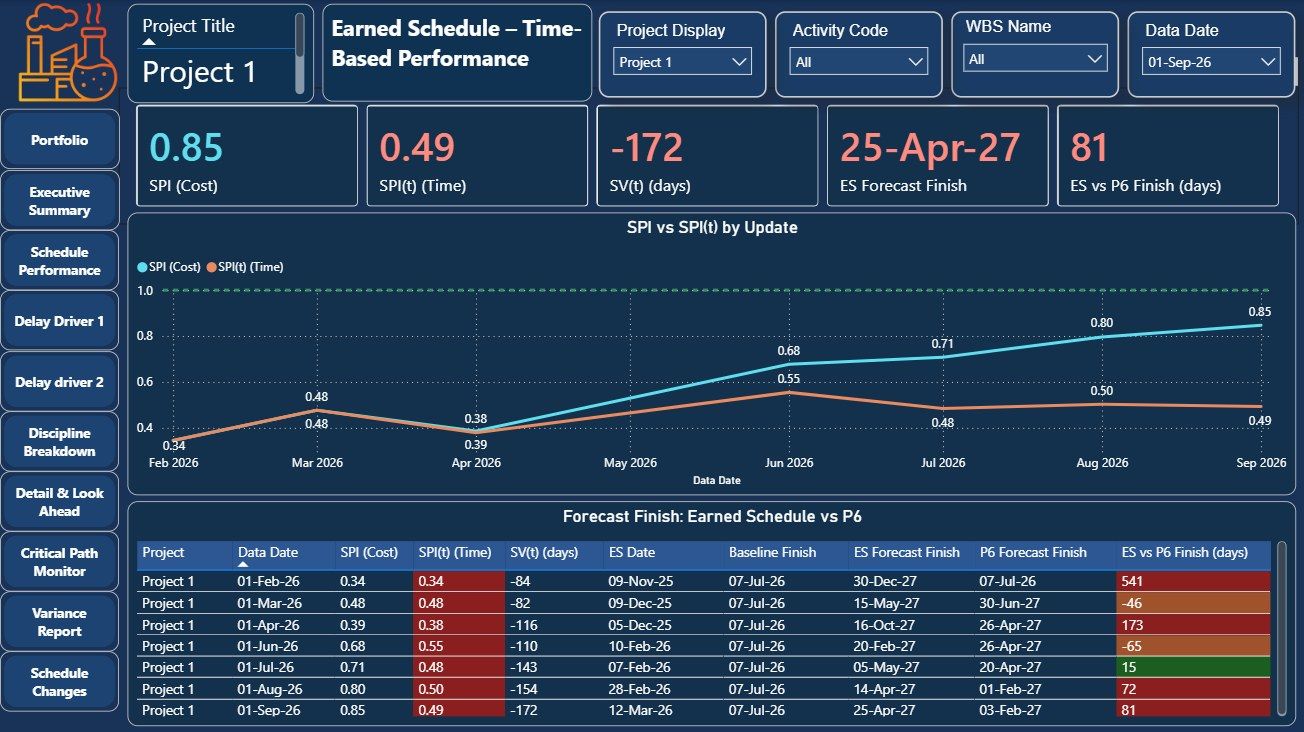
Cost-based SPI drifts back to 1.0 towards the end of a project, even when the project is late. Earned Schedule measures schedule performance in time, and gives a forecast finish that does not hide the delay.
0.85SPI on cost in the example
0.49SPI(t) on time
−172 dschedule variance in time
81 daysES forecast later than P6
The problem
An SPI of 0.85 sounds close to plan. But cost SPI is a ratio of value, not time, and it always moves back towards 1.0 as the project nears completion. It can make a late project look nearly on track.
How it works
- Calculate Earned Schedule. Find the date at which the current earned value should have been achieved.
- Measure performance in time. SPI(t) and SV(t) in days, update by update, next to cost SPI.
- Forecast the finish. Compare the Earned Schedule forecast finish with the P6 forecast for every update.
Walkthrough
Result
In the example, cost SPI showed 0.85 while SPI(t) was 0.49, and the Earned Schedule forecast finish was 81 days later than P6.
Project and client identifiers are hidden in the screenshots.